Bank Statement to Excel: Convert Images to XLSX
Bank statement to excel turns a photographed or screenshotted transaction list into a workbook you can filter, reconcile, and archive. This page focuses on field mapping, privacy (files stay on your device during OCR), and review habits so the conversion does not introduce silent balance errors.
Bank statement to Excel example (sample data)
The pair below is example data from a live conversion: source image on the left, review grid on the right (yellow cells mark uncertain OCR tokens).
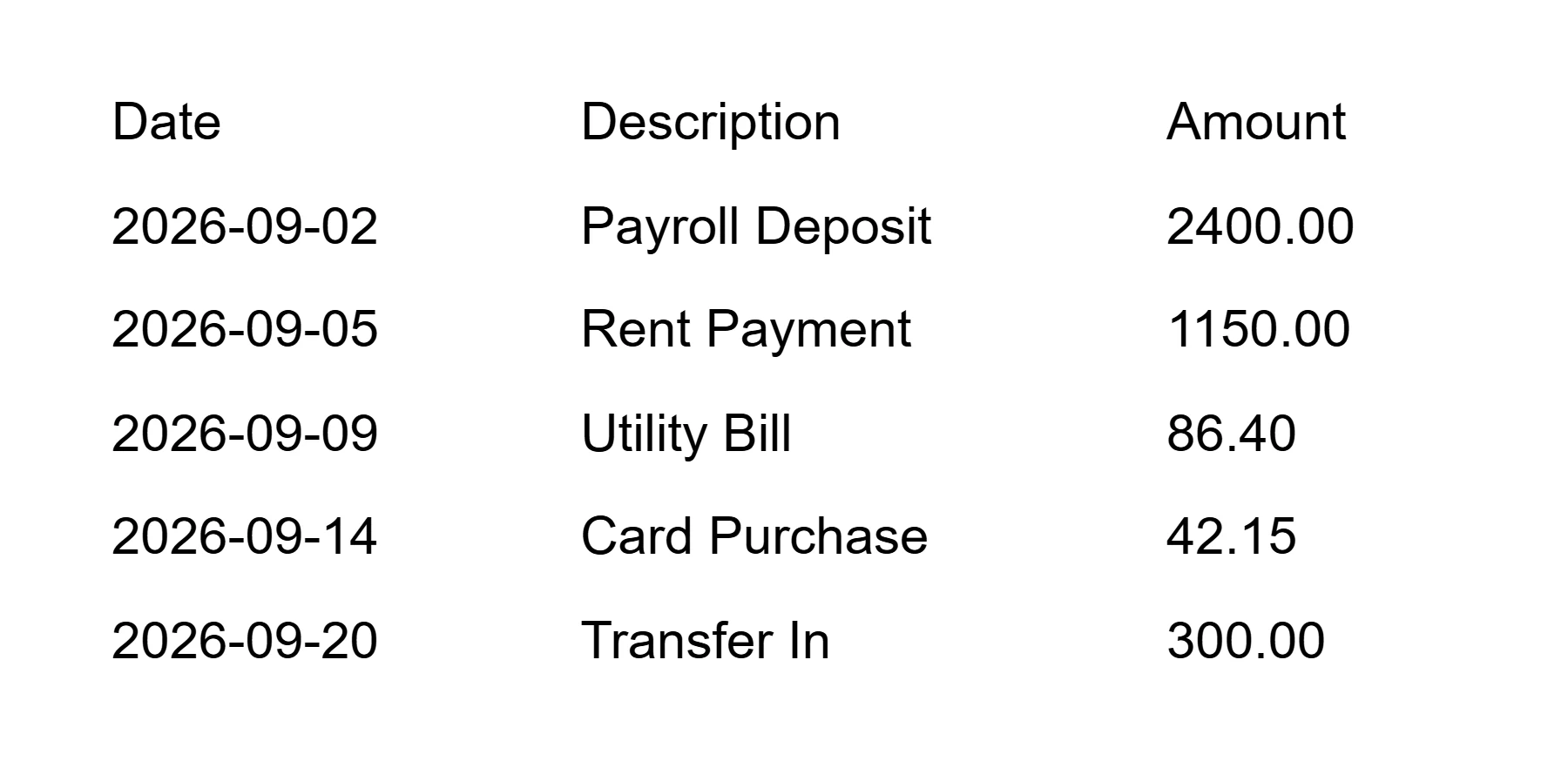
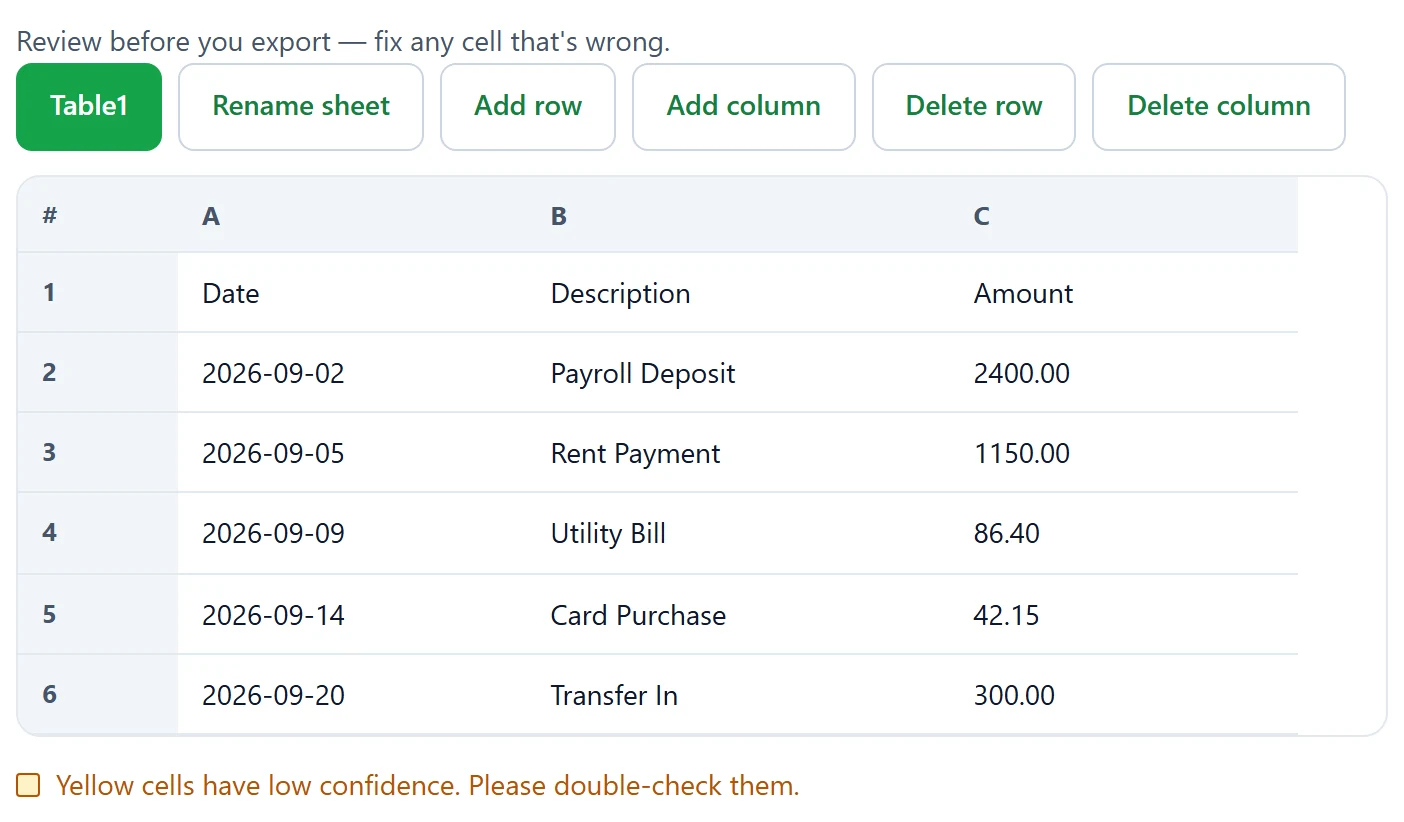
Download a sample workbook from this bank statement to Excel pipeline (example data).
Suggested fields for bank statement to Excel
Normalize every export to the same five columns even if the paper layout differs by bank. Extra columns like check number can sit to the right after you stabilize the core set.
| Field | Meaning | Review focus |
|---|---|---|
| Date | Posting or transaction date | Watch day/month swaps afterward |
| Description | Payee or memo text | Fix truncated merchant strings |
| Debit | Money out | Confirm empty credit cells stay empty |
| Credit | Money in | Do not merge with debit during cleanup |
| Balance | Running balance | Reconcile after edits |
Some banks print signed amounts in one column. Split them into Debit and Credit afterward if your accounting template requires it. Keep original order until reconciliation passes.
Privacy: files stay on the device
Statements contain account activity you should not spray across unknown OCR APIs. Bank statement to Excel on OCR2Excel runs recognition in the browser with WebAssembly — pixels are not uploaded to our servers for that step.
You still download a spreadsheet to disk. Protect that file with your normal disk encryption and access controls. Local conversion reduces transit risk; it does not erase the sensitivity of the finished workbook.
Prefer screenshots that omit full account numbers in the header when policy allows cropping. The transaction table is usually enough for analysis.
Capture tips for statements
- Capture one page section at a time if the PDF is dense.
- Use PNG screenshots for sharp digital statements before conversion.
- Avoid angled photos of paper statements on a couch.
- Include column headers in every crop so you can label fields.
- Process up to three images per run as separate sheets.
Multi-page months become multiple sheets; copy them into one timeline table afterward if you need a continuous register.
Reconcile before you trust the sheet
After export, pick the opening balance and step through a few rows. If Balance diverges, find the first bad Debit or Credit from the conversion and fix it. Yellow cells are the first place to look, but clean-looking digits can still be wrong.
Pair statement work with receipt to excel when you need item detail behind a card total. For general OCR behavior see OCR image to Excel; for step order see how to convert image to excel.
If Microsoft’s Data from Picture is missing on your Excel build, this workflow in the browser keeps the project moving without waiting on licensing.
Working with multi-page statements
A printed statement rarely fits one photo, and the converter accepts up to three images per run — shoot page one, page two, and the continuation in the same session and the sheets arrive as separate tabs in one workbook. Keep a small overlap between pages: repeating the last row of the previous page gives you a checkpoint when you stitch the months together later. If the running balance column breaks across a page break, copy the final balance into a cell and let Excel recompute the intermediate rows instead of trusting every digit. For monthly archives, one bank statement to Excel run per month keeps file names predictable and makes year-end reconciliation a simple matter of stacking twelve consistent sheets.
Who this workflow helps
Freelancers reconciling PayPal exports, small teams digitizing mailed statements, and analysts building cash models from PDF screenshots all use these same flows. The shared theme is structured money data without retyping every description line.
Handwriting on deposit slips is a poor fit — type those rows. Printed ledgers and banking HTML tables are the sweet spot.
Month-end close often needs three or four statement pages. Run it per page, then append rows in date order. Watch for opening and closing balance banners that OCR may place as extra rows — delete those banners so Debit and Credit stay numeric. International wires with long references may wrap visually; widen the Description column afterward and merge broken fragments carefully.
If your bank portal already offers CSV download, prefer that official file. Use this tool when you only have a PDF image, a mailed paper page, or a locked portal screenshot. That distinction keeps the tool in its lane: unlocking image-bound tables, not replacing bank exports. After each session, store the source image beside the workbook for audit trails. When two accounts appear on one PDF, crop each account table before conversion so Debit and Credit columns do not collide.
Bank statement to Excel FAQ
How do I convert a bank statement image to Excel?
Photograph or screenshot the transaction table, run OCR2Excel, align columns to Date, Description, Debit, Credit, and Balance, then download .xlsx. That is bank statement to excel in practice.
Is my image uploaded to a server?
No. Bank statement to Excel on OCR2Excel keeps files on your device during recognition. We do not upload statement images to our servers for OCR.
How accurate is OCR for tables?
Printed statements with clear column gaps work best. Always reconcile Balance after bank statement to excel because a single digit error can cascade.
Is bank statement to Excel safe for personal finance data?
Local processing reduces upload risk, but you still control the downloaded file. Store .xlsx according to your own security policy after bank statement to excel.
What image formats work best?
PNG screenshots of PDF viewers often beat glossy paper photos for bank statement to excel. JPG is fine when lighting is even.
Can I convert a screenshot instead of a photo?
Yes. Screenshots of online banking tables are common inputs for bank statement to excel.
Is image to Excel free?
Yes. Bank statement to Excel via this site needs no account.
Should I use the same fields as receipts?
No. Receipts use Merchant and Tax; statements need Debit, Credit, and Balance. See the receipt to excel guide for expense slips.