Image to Excel Converter: Convert Pictures & Screenshots to Editable XLSX
Use this free image to Excel converter to turn table photos and screenshots into editable spreadsheets in your browser. Files stay on your device — nothing is uploaded for OCR.
Drop your image here, or click to browse
Paste a screenshot with Ctrl+V
PNG, JPG, WEBP · up to 10 MB · processed locally, never uploaded
Yellow cells have low confidence. Please double-check them.
How image to Excel conversion works
-
Upload
Drop a PNG, JPG, or WEBP table photo, browse from disk, or paste a screenshot. Up to three images become separate sheets.
-
Review
We rebuild rows and columns locally. Yellow cells flag uncertain text so you can fix them before export.
-
Export
Download a real .xlsx workbook or a UTF-8 CSV fallback. Open the file in Excel, Google Sheets, or WPS.
Unlike cloud OCR products, this image to Excel flow keeps pixels on your machine. That matters for receipts, bank lines, and price lists that should not travel to a stranger’s server.
Image to Excel example (sample data)
The illustrations below use example data, not a real merchant receipt. Left is the source photo fed to the converter; right is the real on-page review grid (yellow cells mark low confidence). You can also download the matching sample workbooks produced by the same pipeline.
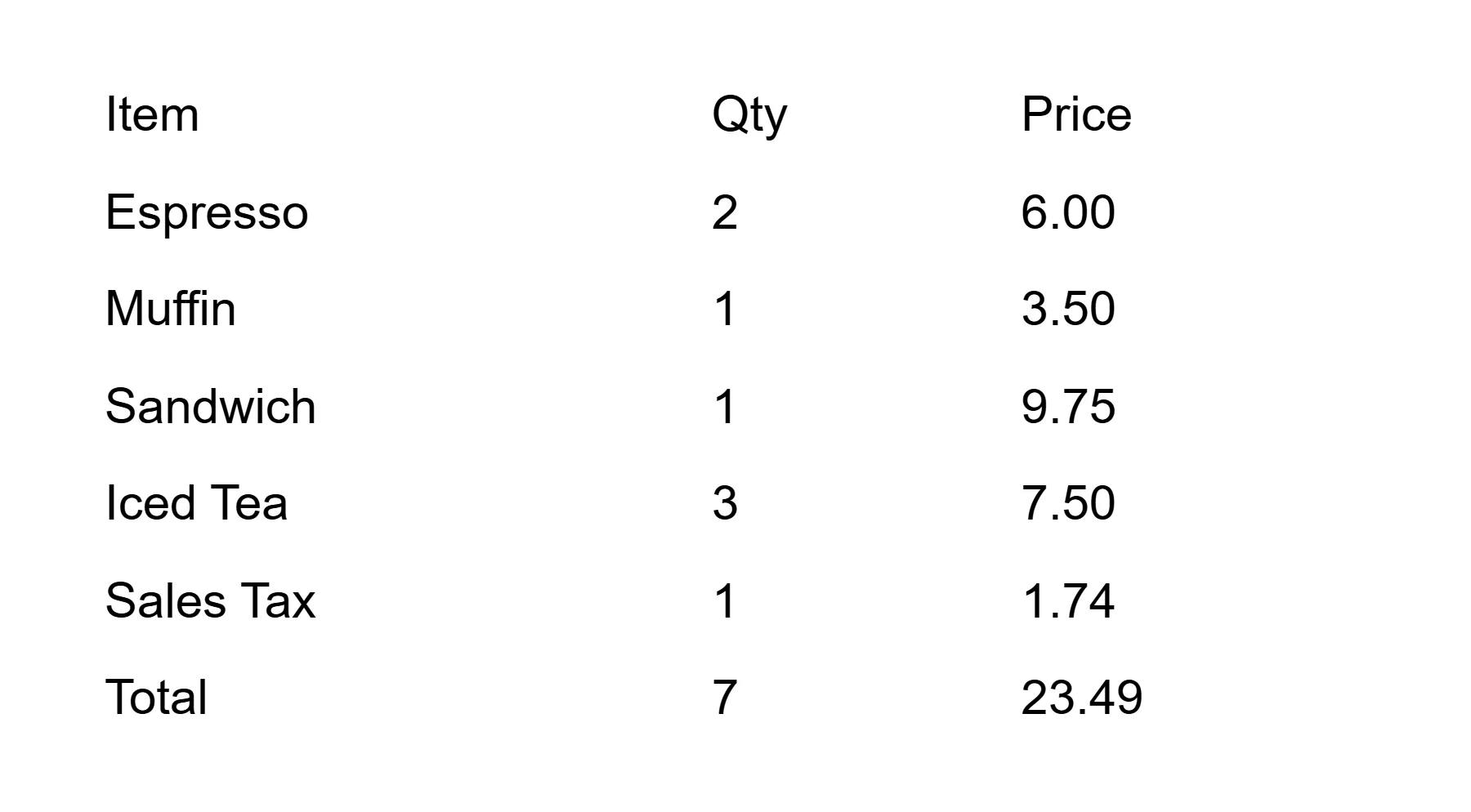
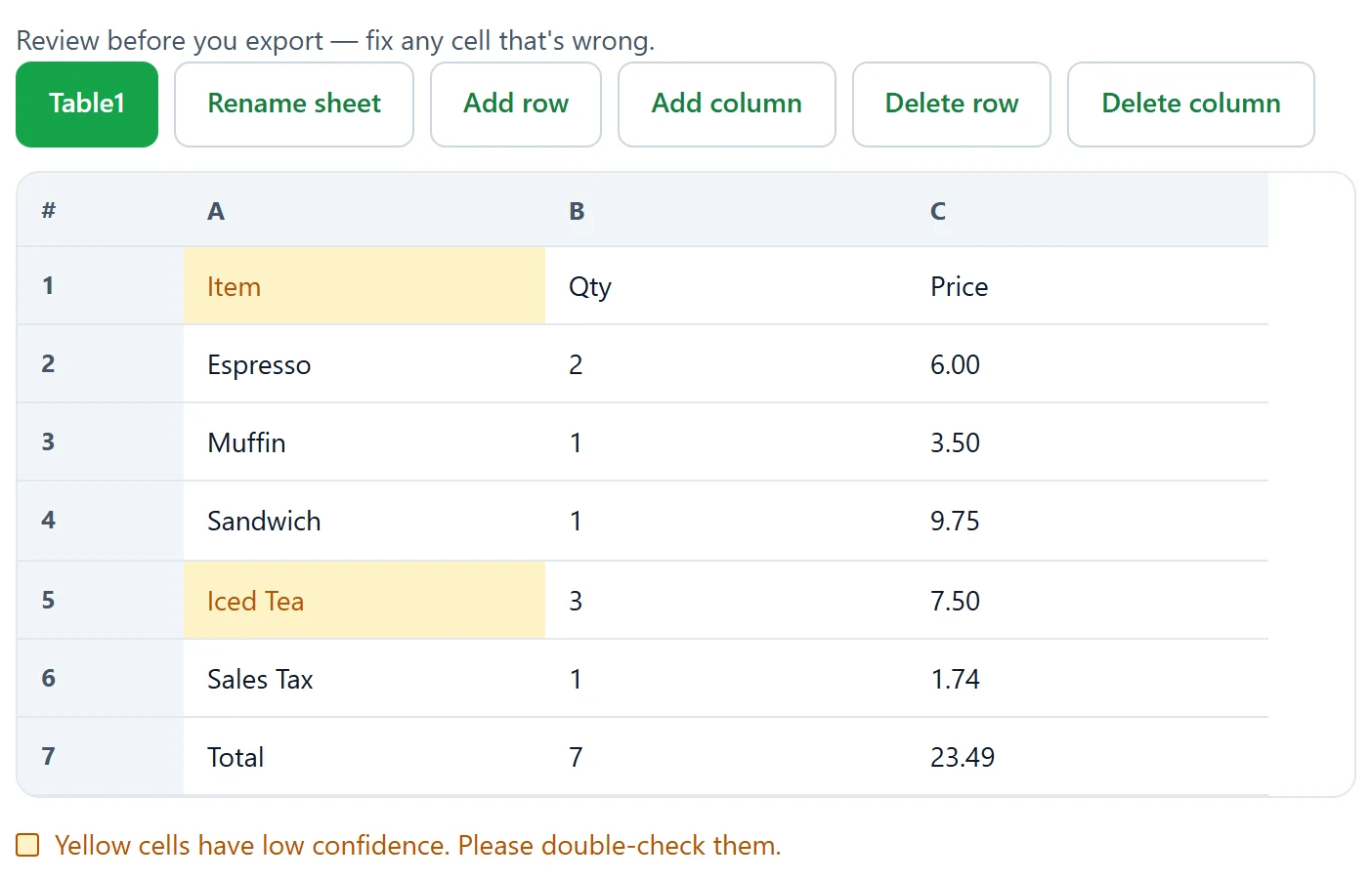
Download a sample workbook (example data): receipt sample .xlsx · bank statement sample .xlsx · price list sample .xlsx
Why process an image to Excel locally
Finance and operations teams often receive tables as phone photos or chat screenshots. Re-typing numbers invites typos. Shipping those images to a random web API creates a privacy review problem. A browser-native image to Excel path solves both: you get a spreadsheet you can sort and sum, and the pixels never leave the tab.
We load the OCR engine only after you click Convert to Excel, so the first screen stays light. The first run may download several megabytes of engine files; later visits reuse the HTTP cache. Progress text tells you that wait is “only the first time.”
If you need a step-by-step walkthrough, read how to convert image to Excel. For engine details, see OCR image to Excel. Scene guides cover receipt to Excel and bank statement to Excel.
Supported formats and limits
- Formats: PNG, JPG/JPEG, WEBP (GIF and PDF are rejected, even if renamed).
- Size: each file up to 10 MB; up to three files and 20 MB total per run.
- Pixels: edges longer than 4000 px are resized automatically with a non-blocking notice.
- Language: English is available now; numbers are recognized by default.
- Output: .xlsx primary download, CSV with UTF-8 BOM as a fallback.
For sharper results, photograph tables straight on, avoid heavy shadows, and crop away wallpaper or desk clutter before you convert. Handwriting has honest limits — see handwritten table to Excel. If Excel’s own Data from Picture control is missing, our data from picture Excel missing guide lists common causes.
Troubleshooting your image to Excel run
The file is rejected
Check the real type, not only the extension. A PDF or GIF renamed to .png will still be blocked. If the message shows a megabyte number, compress the photo or lower camera quality under the 10 MB cap.
The grid looks wrong
Skewed photos and multi-column layouts without clear gaps confuse row detection. Rotate or crop in the preview, then convert again. Fix yellow cells before you trust the totals.
The engine will not load
A flaky network can interrupt the first engine download. Use Retry, or reload the page and try once more on a stable connection. Browsers without WebAssembly or Workers show an explicit unsupported message instead of failing silently.
Image to Excel FAQ
Is image to Excel free?
Yes. OCR2Excel is free to use in your browser with no account. You can convert an image to Excel and download an .xlsx or CSV file without paying.
How to convert image to Excel on mobile?
Open this page on your phone, choose a photo from your camera roll or take a new picture of the table, tap Convert to Excel, review the cells, then download the file. The layout works from about 375px wide.
Does Excel have an image to Excel feature?
Microsoft Excel includes Data from Picture on some plans and platforms. If that button is missing or incomplete, an online image to Excel converter like this one can still turn a clear table photo into an editable spreadsheet.
Is my image uploaded to a server?
No. Recognition runs locally with WebAssembly in your browser. Your image is not uploaded to OCR2Excel servers for processing.
How accurate is OCR for tables?
Accuracy depends on lighting, focus, and table structure. Printed tables with clear lines work best. Low-confidence cells are highlighted in yellow so you can fix them before you export.
Can it handle multiple tables in one image?
When the layout is clear, separate tables can be split into multiple worksheets in one workbook. Always review the sheets before downloading.
What image formats work best?
PNG, JPG, and WEBP up to 10 MB each work best. Straight-on photos of printed tables usually beat angled phone shots. PDF and GIF are not supported in this version.
Can I convert a screenshot instead of a photo?
Yes. Paste a screenshot with Ctrl+V (or Cmd+V), or drop a PNG screenshot into the upload area, then convert image to Excel the same way.
Why is data from picture missing in Excel?
Data from Picture availability depends on Excel version, license, and region. If the feature is missing, use this free image to Excel tool as an alternative, then open the downloaded file in Excel.
Can OCR read handwritten tables?
Handwriting is harder than print. Dark, neat writing on plain paper can partially work, but you should expect to edit yellow cells. See our handwritten table guide for honest limits.